A good Google Ads account structure splits a campaign only when it needs its own budget, bid target, locations or networks, and splits an ad group only when it needs its own ads or landing page. Everything else stays together, so bidding has more data to learn from.
Most structure guides hand you numbers: so many keywords per ad group, so many ad groups per campaign. Google publishes limits, not targets. This guide ties every split to the setting it controls, then shows how to fix an account you inherited without throwing away its history.
What does a Google Ads account structure that works look like?
A Google Ads account structure that works lets you control spend and read results at the level where each decision is made. Google describes three layers: the account, campaigns and ad groups. Campaigns have their own budget and settings that determine where ads appear, and ad groups contain a set of similar ads and keywords.
So the campaign controls money and reach, and the ad group matches the message to the search. Google’s own rule for Google Ads campaign structure is short: if keywords share a budget and target, they belong in the same campaign, and if they share a landing page and creative theme, they belong in the same ad group.
Structure matters more than it looks, because you can only see what you separated. On the page that explains how we build Google Ads accounts, we put it this way: “Structure decides what you can control later. A badly built account still spends; it just can’t tell you what happened.”
When should you split a campaign, and when should you keep it together?
Split a campaign when part of the account needs a different budget, bid target, set of locations or network setting. Keep it together when nothing at campaign level would change, because every split divides the data that automated bidding learns from.
Google is direct about that cost. Its account structure guidance says segmented traffic makes Smart Bidding optimize for multiple targets separately, which can reduce efficiency.
| What needs to be different | Where Google Ads sets it | Split into | Example (hypothetical) |
|---|---|---|---|
| Daily budget | Each campaign has its own daily budget | A separate campaign | Branded searches kept apart from everything else |
| Bid target, such as target CPA | The bid strategy: standard for one campaign, or a portfolio shared by several | A separate campaign, or a portfolio strategy if several campaigns share one target | A high-value service that can afford a higher cost per lead |
| Locations | Campaign settings | A separate campaign, only if the budget or target also differs | Two service areas, each with its own budget |
| Networks | Campaign settings, under Networks | A separate campaign | Testing search partners without changing the main campaign |
| Ads and landing page | The ad group | A separate ad group in the same campaign | “Emergency plumber” and “boiler installation” for one plumbing company |
| Match type only | No separate setting | Don’t split | The same keyword in broad, phrase and exact match |
| Device only | No separate setting needed | Don’t split | Mobile and desktop copies of the same campaign |
Both “don’t split” rows come from Google. Google says there is no added benefit to multiple match types when using Smart Bidding, because duplicating keywords across match types segments the data it uses. The same guidance recommends removing device segmentation, since Smart Bidding already accounts for device, and segmenting campaigns by business objective instead.
You also have two ways to keep control without splitting. A shared budget allocates one budget across multiple campaigns instead of setting one for each. A portfolio bid strategy applies to multiple campaigns, and in Google’s words, “your campaigns, ad groups, and keywords are optimized collectively for a single target.” If two campaigns only exist to hold the same target, a portfolio strategy can hold it for both.
Our rule for how to structure Google Ads campaigns is simpler than any keyword count. If you can’t name the setting that’s different, it’s the same campaign.
Should brand and non-brand be separate campaigns?
Yes. Branded searches, where someone types your company’s name, come from people who already know you. Mixed into the same campaign as everything else, they make the rest of the account look better than it is.
We track branded search separately for exactly that reason. People searching your company name were largely coming anyway, so counting those conversions as campaign performance flatters the account. Separation fixes a budget problem too. Because each campaign has its own daily budget, a separate brand campaign stops brand clicks and non-brand clicks from competing for the same money. In the accounts we run, branded search, high-value services and experiments never share a budget.
Separation only holds if your non-brand campaigns stay off brand queries. Brand exclusions keep campaigns from serving for branded queries you want to avoid. You can set them on Search campaigns, and in Performance Max they apply to Search, Shopping and YouTube search inventory.
Whether to bid on your own brand at all is a separate question. Our answer depends on whether competitors are bidding on it.
How many ad groups and keywords should a campaign have?
A campaign needs as many ad groups as it has distinct messages and landing pages, and fewer keywords than most accounts carry. Google publishes limits, not targets.
Google’s limits are high: 10,000 campaigns per account, 20,000 ad groups per campaign and 20,000 targeting items per ad group. Nobody should build toward them. And the counts in popular structure guides, like 15 to 20 keywords per ad group, don’t appear in Google’s ad group guidance.
What Google gives instead is a theming rule for ad group structure. Pick a narrow theme for each ad group, and choose keywords closely linked to the ad text. Google suggests the way your website is structured is a good place to start. Each ad group can run 3 enabled responsive search ads, so the theme has to be narrow enough for those 3 ads to answer every keyword in it.
On keywords, our answer is “fewer than most accounts have.” Closely related keywords let each ad answer the real search, and sending every click to the homepage wastes most of them. If an ad group’s keywords need different landing pages, it’s two ad groups.
Are single keyword ad groups still worth building?
For most accounts using Smart Bidding, no. Single keyword ad groups, often called SKAGs, put one keyword in each ad group for maximum control, and Google now recommends moving them into themed ad groups.
Google’s argument is about data. Duplicating keywords across match types segments the data Smart Bidding uses, and Google says broad match is the only match type that uses all available intent signals. Its guidance is to consolidate themed ad groups and simplify to broad match.
We agree with the direction, with one condition. Broad match keeps widening what you match to, “until you’re paying for queries no one would have approved if asked.” Consolidation is only safe when someone reads the search terms, which is why we review them weekly, not monthly.
The control that replaces SKAGs is negative keywords. An account-level negative keyword applies to all eligible search and shopping inventory in relevant campaign types, which suits terms a business never wants, such as “jobs” for a hypothetical plumbing company. Negative keywords don’t match close variants, so add plurals and synonyms yourself.
Where does Performance Max fit in the structure?
Performance Max runs alongside your Search campaigns, and how closely a query matches your keywords decides which one serves. Search campaigns with an exact match keyword identical to the query are prioritized over Performance Max. Performance Max search themes get the same priority as phrase and broad match keywords.
That gives you a structural lever. If a specific query matters enough to control its ad and landing page, an exact match keyword for it in a Search campaign takes priority whenever someone searches exactly that.
Brand is the other overlap: set Performance Max brand exclusions if your brand campaign is meant to own those searches.
Our order for most lead-generation accounts is controlled Search first, then Performance Max once there’s enough conversion data for it to learn from something real. We use it where it fits and say so when it doesn’t.
How do you restructure an inherited account without losing its history?
Restructure an inherited account inside the existing account, in stages, and test the big changes before applying them. The account holds conversion history, and Google says conversion data from previous campaigns can speed up the initial learning period. A new account starts without it.
At Crisolva, we restructure around valuable conversion history. We work in the existing account wherever possible, rebuild from scratch only when the existing structure makes optimization impossible, and explain why before doing it.
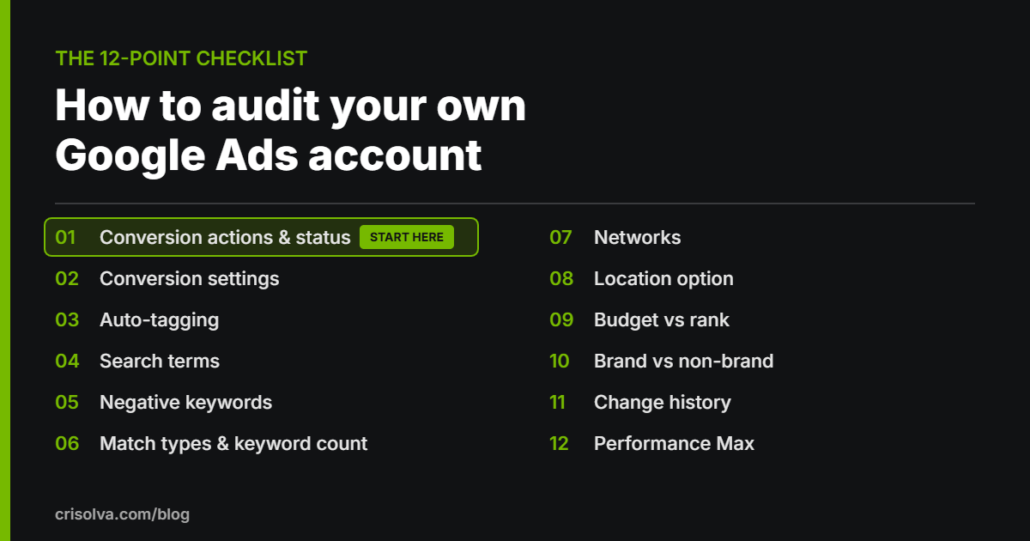
- Fix tracking first. A structure built on wrong conversion numbers is just wrong in a new shape. If you haven’t checked yours, start with our 12-point Google Ads audit. We fix tracking before we optimize anything.
- Map every campaign against the split test. For each campaign, name the setting that makes it different. Campaigns with nothing different are candidates to merge. Campaigns that mix things the test says to separate, such as brand and non-brand, are candidates to split.
- Know what restarts learning, and batch your changes. Google lists a composition change, where campaigns, ad groups or keywords are added to or removed from a bid strategy, as one reason a strategy shows a “Learning” status. Make related changes together so the strategy relearns once, not every week.
- Test big changes as a custom experiment. A custom experiment is a copy of your original campaign that you change and compare against the original. It shares the original’s traffic and budget, and Google recommends a 50% split. Applying a winning experiment moves the tested changes into the original campaign, and the performance data is kept. Experiments support Search, Display, Video and Hotel campaigns.
- Judge results after learning, not during it. Google says calibration can take “a few conversion cycles (1-2 typically).” A conversion cycle is how long it takes a click to become a conversion, so a business with a long sales process waits longer.
- Rebuild only when you must. If the structure makes optimization impossible, a clean build may be the faster route. Write down why before you do it, so the decision can be checked later.
If you’d like a second opinion before you move anything, a free Google Ads audit will tell you which parts of the structure are worth keeping.
When is restructuring the wrong move?
Restructuring is the wrong move when the problem isn’t structure. A new layout can’t fix a bad number or a bad search, and each round of changes can restart learning. Hold off in these situations:
- Your conversion tracking is broken. Fix it first. A new structure won’t make wrong numbers right.
- The waste is in the search terms. Spend on searches nobody approved is a negatives and match type problem, and it follows you into any structure.
- A bid strategy is still learning from your last round of changes. Another composition change can trigger learning again before you’ve read the results of the first.
- Your spend is too low to produce data. Below $1,000 a month in Google Ads, you won’t gather enough data to optimize properly, which is why it’s the minimum ad spend we publish. At that level, fewer campaigns is the only structure that makes sense.
- Your sales cycle is long and you changed things recently. Conversion cycle length affects how long learning takes, so B2B accounts with long buying cycles need more patience between changes, not more changes.
Structure is a set of decisions, and you should be able to name each one. If nobody can say why a campaign exists, it probably shouldn’t.
Google Ads account structure: FAQs
How many campaigns should a Google Ads account have?
One for each decision you need to control separately, such as a different budget, bid target, set of locations or network setting, and no more. Google’s limit is 10,000 campaigns per account, which is a ceiling, not a target. Google’s own guidance is that keywords sharing a budget and target belong in the same campaign.
Does restructuring a Google Ads account reset learning?
It can. Google lists a composition change, where campaigns, ad groups or keywords are added to or removed from a bid strategy, as a reason the strategy shows a Learning status. Google says calibration typically takes 1–2 conversion cycles, and that learning doesn’t apply to Manual CPC bidding.
Should you create a separate campaign for each location?
Not automatically. Location targeting is set in a campaign’s settings, and one campaign can target many locations, so you only need a separate campaign when a location needs its own budget or bid target. Google says segmented traffic makes Smart Bidding optimize for multiple targets separately, which can reduce efficiency, so don’t split by location out of habit.
How should a B2B company structure Google Ads?
Keep branded searches in their own campaign, and split services only when their budgets or target cost per lead differ. B2B sales cycles are often long, and Google says the length of the conversion cycle affects how long bid strategies take to learn. Fewer campaigns with more conversion data each usually serve a B2B account better.
How often should you review a Google Ads account structure?
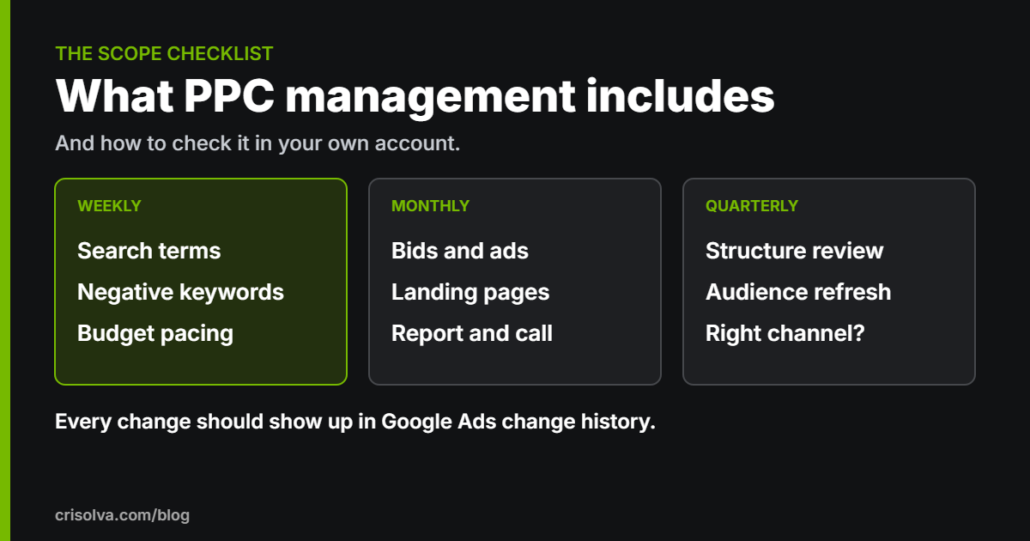
Crisolva reviews account structure quarterly and search terms weekly. Structure should change far less often than bids or negatives, because each composition change can put a bid strategy back into learning. A quarterly review is frequent enough to catch drift and rare enough to let changes settle.
Sources
- Google, “About your account organization”, Google Ads Help, undated (accessed October 19, 2026)
- Google, “The ABCs of Account Structure”, Google Ads Help, undated (accessed October 19, 2026)
- Google, “Organize your account with ad groups”, Google Ads Help, undated (accessed October 19, 2026)
- Google, “About your Google Ads account limits”, Google Ads Help, undated (accessed October 19, 2026)
- Google, “Set and change an average daily budget for your campaign”, Google Ads Help, undated (accessed October 19, 2026)
- Google, “Manage a shared budget across campaigns”, Google Ads Help, undated (accessed October 19, 2026)
- Google, “About Target CPA bidding”, Google Ads Help, undated (accessed October 19, 2026)
- Google, “Target ads to geographic locations”, Google Ads Help, undated (accessed October 19, 2026)
- Google, “About the Google Search Network”, Google Ads Help, undated (accessed October 19, 2026)
- Google, “About bid strategy statuses”, Google Ads Help, undated (accessed October 19, 2026)
- Google, “Duration of the learning period for campaigns and what affects it”, Google Ads Help, undated (accessed October 19, 2026)
- Google, “Set up a custom experiment”, Google Ads Help, undated (accessed October 19, 2026)
- Google, “About Performance Max campaigns”, Google Ads Help, undated (accessed October 19, 2026)
- Google, “Apply brand exclusions to Performance Max or Search campaigns”, Google Ads Help, undated (accessed October 19, 2026)
- Google, “About negative keywords”, Google Ads Help, undated (accessed October 19, 2026)
Not sure whether your structure is the problem?
A second pair of eyes can tell you if restructuring is the answer, or if the real issue is tracking or search terms. Our free Google Ads audit is reviewed by a specialist within 3–5 business days and delivered as a recorded walkthrough or written report covering the top 5–10 findings.
It’s free, there’s no obligation, and the findings are yours to keep either way.