What does PPC management include? At minimum: weekly search term and budget checks, monthly bid, ad and landing-page work with a report that explains what changed, a quarterly structure review, and working conversion tracking. You should own the ad account, and every change should be visible in its change history.
Most lists of PPC deliverables stop at the list. This one adds the part a buyer needs: how often each task should happen, and where to see it in your own Google Ads account, so you can tell work from a report about work.
What does PPC management include?
PPC management includes the ongoing work that keeps an ad account spending on the right searches: reviewing what people searched, controlling budgets, testing ads, keeping conversion tracking honest and reporting what changed. A setup is done once. Management is the part that repeats.
The table below lists the PPC account management tasks we’d expect from any provider, ours included, with the cadence we publish for how we scope PPC management. The last column matters most. Changes a manager makes in Google Ads leave a trace in change history, which lists every change to the account, campaigns and ad groups over the past 2 years.
| Task | How often (our cadence) | What you should get | How to check it yourself |
|---|---|---|---|
| Search term review and negative keywords | Weekly | Negatives added and searches flagged | Change history shows each change and the user who made it |
| Budget pacing and anomaly checks | Weekly | A note when spend or cost per acquisition moves unexpectedly | Budget edits in change history |
| Bid strategy review | Monthly | The reasoning in the monthly report | Bid strategy changes in change history |
| Ad testing and landing-page recommendations | Monthly | New ads and specific page suggestions | New ads and edits in change history |
| Conversion tracking connected to your CRM | Before optimization, then ongoing | Reported leads that match real leads | Ask which conversion actions bidding uses, and compare with your CRM |
| Monthly report and call | Monthly | Spend, leads and cost per lead by campaign; what changed and why; what changes next | Match the report’s “what changed” to change history |
| Structure review | Quarterly | A written recommendation | Campaign and ad group changes in change history |
| Auto-applied recommendations | Ongoing | A decision on which, if any, run without review | The Recommendations “History” tab |
If a provider’s list is longer than this, fine. If it’s shorter, ask which of these rows nobody is doing.
What should a PPC manager do every week, month and quarter?
What does a PPC manager do? They read your search terms and watch your budget every week, review bidding, ads and landing pages every month, and step back to the account’s structure every quarter. That’s the cadence behind our weekly, monthly and quarterly rhythm for Google Ads, and it maps to how fast each kind of problem costs you money.
Weekly is about waste. The search terms report shows how your ads performed when real searches triggered them. A search term is what someone actually typed; a keyword is what you added to the account. The gap between the two is where budgets leak, which is why the week also includes negative keywords, budget pacing and an anomaly check on cost per acquisition.
Monthly is about improvement: a bid strategy review, ad testing, landing-page recommendations and a report with a call. Quarterly is about direction: a structure review, an audience refresh, and an honest look at whether Google is still the right home for the budget.
Some of this can be automated, and the split matters. We automate lead response and qualification, after-hours enquiry capture, bid adjustments inside guardrails we set, spend and cost-per-acquisition alerts, and report generation. We still do search term review, negative keyword decisions, budget reallocation between campaigns, ad and offer testing, and the call on when to override automated bidding by hand. Automation handles volume and speed. It does not decide what a campaign is for.
Who should own the ad account, and what access should the agency get?
You should own the ad account, and the agency should get the access it needs to do the work and no more. In practice, that means you keep Admin access and the agency works with Standard access or through a linked manager account.
Google Ads has five access levels: Email only, Billing, Read-only, Standard and Admin. Standard can edit campaigns and billing, but it can’t manage full user access or unlink manager accounts. Only Admin can give account access, change access levels, accept or reject manager link requests, and unlink a manager account.
A manager account is a Google Ads account that lets an agency view and manage multiple client accounts. A link only completes after your account accepts it, and anyone with administrative access to your account can unlink it at any time. One setting deserves a direct question: a manager account can be given ownership of a client account, which lets it manage user access. Ask who holds that.
Our position on this is simple. At Crisolva, you own the ad account, always. Campaigns are built in your account under your billing, and if we stop working together you keep the account, the history, the conversion data and the audiences. When an agency runs your ads from its own manager account instead, it keeps all of that when you leave. Ask any provider you’re considering where your campaigns will live.
How can you check the work is actually being done?
You can check most PPC work yourself, without relying on anyone’s report. Open change history, read the auto-apply history, and compare both with what the monthly report says happened.
- Open change history from the Campaigns menu. Its User column shows the email address of whoever made each change in the interface, and automated changes appear under names such as “Google Ads system”. A month with no changes from your provider is worth asking about.
- Check what Google changed on its own. Recommendations can be applied automatically, and the Recommendations “History” tab summarizes the recent ones. Auto-apply can be turned on or off at any time, so the question is whether anyone decided.
- Match the report to the history. The monthly report should show spend, leads and cost per lead by campaign, what changed and why, and what changes next. If the “what changed” section doesn’t appear in change history, ask why.
Don’t use optimization score as the scorecard. Google describes optimization score as “an estimate of how well your Google Ads account is set to perform”, from 0 to 100%. Applying or dismissing recommendations changes it, so a high score shows that recommendations were handled. It doesn’t show that the account produced good leads.
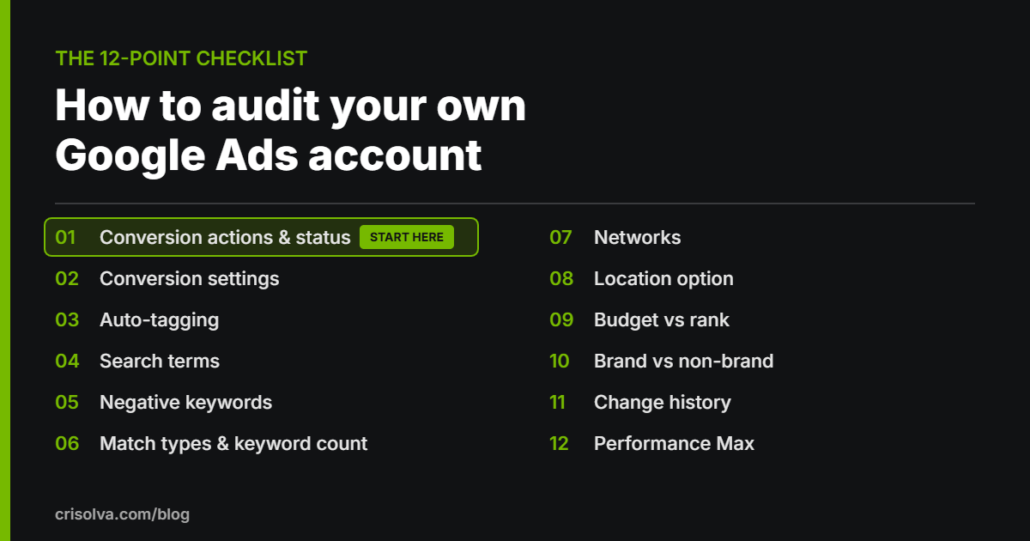
If you want a fuller check, run our 12-point audit yourself. If you’d rather have someone independent check what your current provider is doing, a free Google Ads audit works with read-only access.
What isn’t included in a PPC management fee?
Ad spend isn’t included in a PPC management fee. It should be paid directly to Google, Meta or LinkedIn from your own account, separate from what you pay the people managing it.
Separate builds usually sit outside the fee too. A landing page is the common one: recommendations about the page belong in management, but building a new page is a separate job, and we quote it separately when the traffic needs a page that doesn’t exist yet. Check any proposal for the other edges of scope, such as creative production, so nothing arrives as a surprise.
How the fee is calculated shapes the work, so read that line closely. With a percentage of ad spend, the agency earns more when you spend more. A flat monthly fee is predictable and keeps media spend separate from management. Performance-based fees can create pressure to optimize for easier, lower-quality leads. We publish what’s in and out of our fee and charge no percentage of spend and no setup fee.
When is PPC management the wrong thing to pay for?
PPC management is the wrong thing to pay for when the account can’t produce enough data to manage, or when the problem sits outside the ads. Hold off if any of these describe you:
- Your ad spend is under $1,000 a month. Below that level there usually isn’t enough conversion data to make meaningful optimization decisions, and the landing page and follow-up speed are better places for the money.
- Nobody can follow up on a lead within a day. Management can improve the leads, but it can’t answer them.
- You want guaranteed results. Nobody can honestly promise those.
- You only want a one-off setup. That’s a build, not management, and an account left alone after launch drifts.
If none of those apply, use the checklist above as your answer to what should be included in PPC management, and compare providers on what they’ll actually do, not on how their proposal reads.
What PPC management includes: FAQs
What’s the difference between PPC management and a PPC setup?
A setup builds the campaigns once. Management is the ongoing work after launch: weekly search term and budget checks, monthly bid, ad and landing-page work with a report, and a quarterly structure review. Crisolva doesn’t take on one-off setups with no ongoing management, because an account left alone after launch has nobody reading its search terms.
What access should you give a PPC agency?
Enough to do the work, while you keep Admin. Google Ads Standard access can edit campaigns and billing, but only Admin can give account access, change access levels or unlink manager accounts. For an audit, read-only access is enough: Crisolva’s free Google Ads audit works with read-only access.
How do you see what your PPC agency changed?
Open change history from the Campaigns menu in Google Ads. It lists changes to the account, campaigns and ad groups over the past 2 years, and its User column shows the email address of whoever made each change in the interface. Automated changes appear under names such as “Google Ads system”.
Is optimization score a good way to judge a PPC manager?
No. Google describes optimization score as an estimate of how well an account is set to perform, from 0 to 100%, and applying or dismissing recommendations changes it. A high score shows recommendations were dealt with, not that the account produced good leads. Judge the work on leads and what they turned into.
What should PPC management include for a B2B company?
Everything in a standard scope, plus a connection to your CRM. In B2B, qualified leads, opportunities and closed deals live in the CRM, and the ad platform can’t see them. Crisolva connects the two before optimizing anything, so the account is judged on pipeline rather than form fills.
Sources
- Google, “About change history”, Google Ads Help, undated (accessed October 20, 2026)
- Google, “About the search terms report”, Google Ads Help, undated (accessed October 20, 2026)
- Google, “About access levels in your Google Ads account”, Google Ads Help, undated (accessed October 20, 2026)
- Google, “About Google Ads manager accounts”, Google Ads Help, undated (accessed October 20, 2026)
- Google, “About applying recommendations automatically”, Google Ads Help, undated (accessed October 20, 2026)
- Google, “About optimization score”, Google Ads Help, undated (accessed October 20, 2026)
Want to know what your current account is actually getting?
An independent look will show which parts of the scope are being done and which aren’t. Our free Google Ads audit is reviewed by a specialist within 3–5 business days and delivered as a recorded walkthrough or written report covering the top 5–10 findings.
It’s free, there’s no obligation, and the findings are yours to keep either way.